
SMS Opt-In Compliance Documentation
This page documents the SMS opt-in flows used by Stoked-powered communities for A2P 10DLC campaign vetting purposes.
Platform: Stoked — community engagement software that connects brands with their customer advocates via SMS conversation relay.
Message sender: Each brand/community sends SMS from its own dedicated Twilio phone number. Stoked provides the platform; the brand operates the messaging program. Recipients opt in to messages from the specific community they interact with, not from Stoked as a company.
Privacy Policy: https://[brand].stokedhq.com/privacy — e.g. https://rakefire.stokedhq.com/privacy
Terms of Service: https://[brand].stokedhq.com/terms — e.g. https://rakefire.stokedhq.com/terms
Message Use Case
Messages sent through Stoked communities are conversational and transactional only. They are direct, one-on-one exchanges between a community member and a brand advocate. No marketing blasts, promotions, or automated campaigns are sent. Specific message types include:
- Replies from advocates to prospect inquiries
- Notifications of new messages or replies in an active conversation
- Account activity alerts (e.g., application status updates)
- Community interaction notifications
- One-time authentication codes for account verification and login
Two Opt-In Flows
Stoked communities have two distinct user types — Prospects (people who reach out with a question) and Advocates (vetted community members who answer questions on behalf of the brand). Each has a separate, documented opt-in path.
Flow 1: Prospect Opt-In — Two-Step “Send a Message” Form
Prospects encounter SMS opt-in when they initiate a conversation with an advocate from the community site.
Where this happens
Every advocate has a public profile page at [brand].stokedhq.com/[slug]. A “Send a message” panel is embedded on the profile. The URL includes the brand’s subdomain and displays the brand name and logo — the prospect knows exactly which community they are messaging.
Example: https://rakefire.stokedhq.com/phil
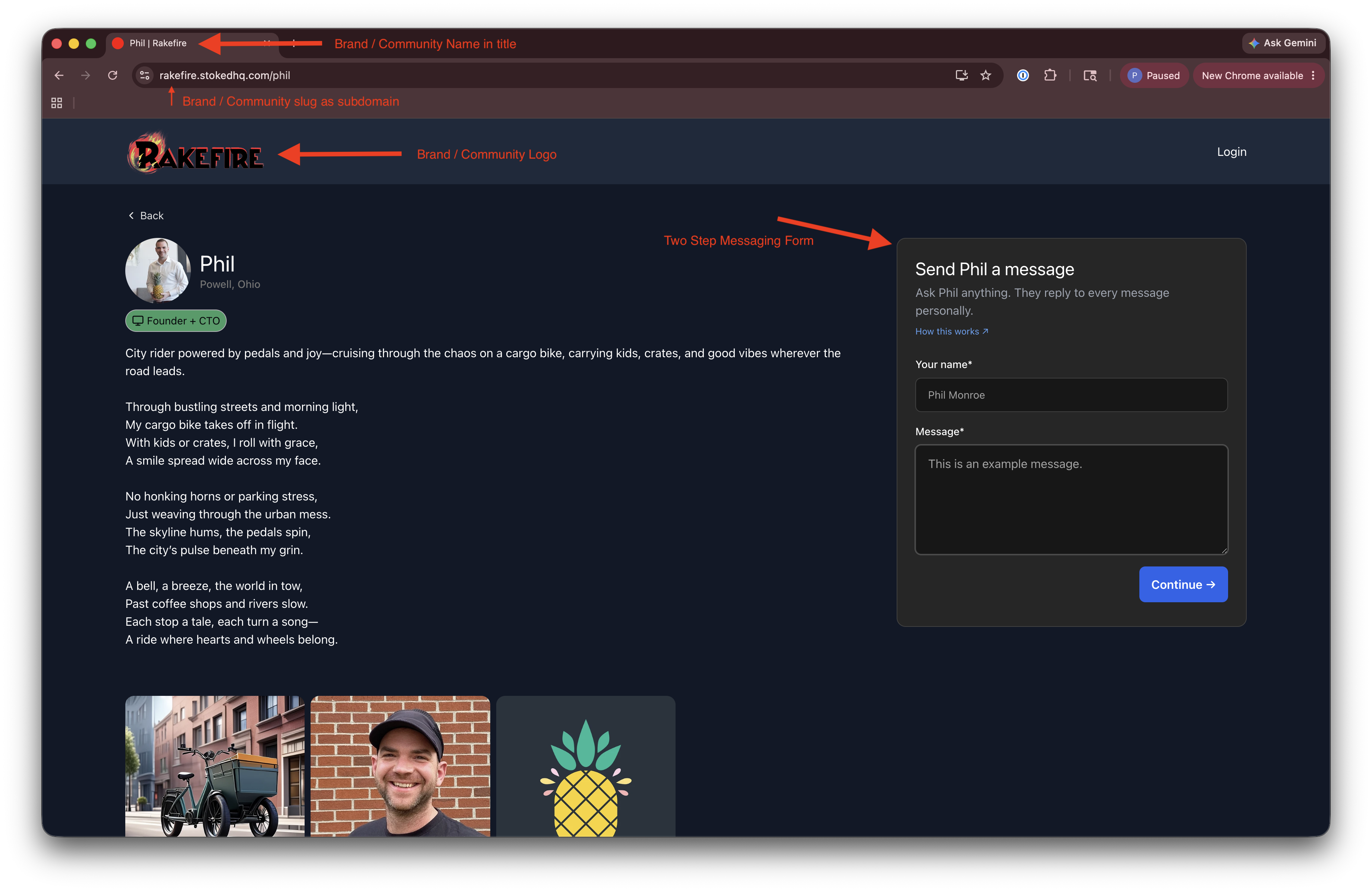
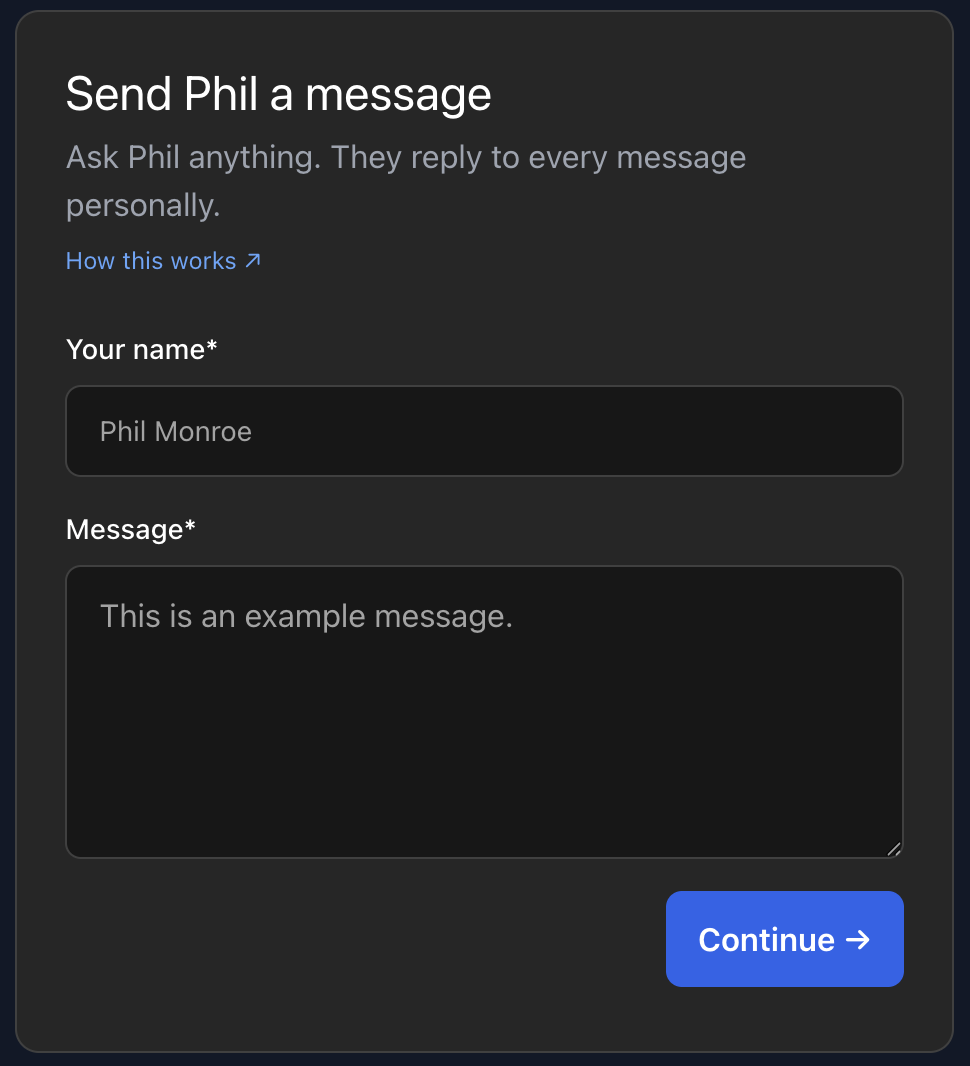
Step 1: Compose message
The prospect fills in their name and the message they want to send, then taps Continue.
No phone number is collected at this step. The user has not yet committed to SMS.
Step 2: Channel selection and explicit SMS opt-in
After composing their message, the prospect chooses how they want to receive the advocate’s reply:
- Text message — Phil replies to your phone
- Email — Phil replies to your inbox
If the prospect selects Text message, they must:
- Enter their phone number
- Review and check the SMS consent checkbox to confirm their channel preference
The checkbox language displayed to the prospect is:
I agree to receive text messages from the [Community Name] community related to my conversations, account activity, and other community interactions. Message frequency varies based on my activity. Message and data rates may apply. Reply STOP to opt out. Reply HELP for help. I will not receive marketing or promotional messages.
A privacy notice below the phone field reads:
Your number is never shared — [Advocate name] replies through [Community Name]’s number.
The form also links to the community’s Terms of Service and Privacy Policy before submission.
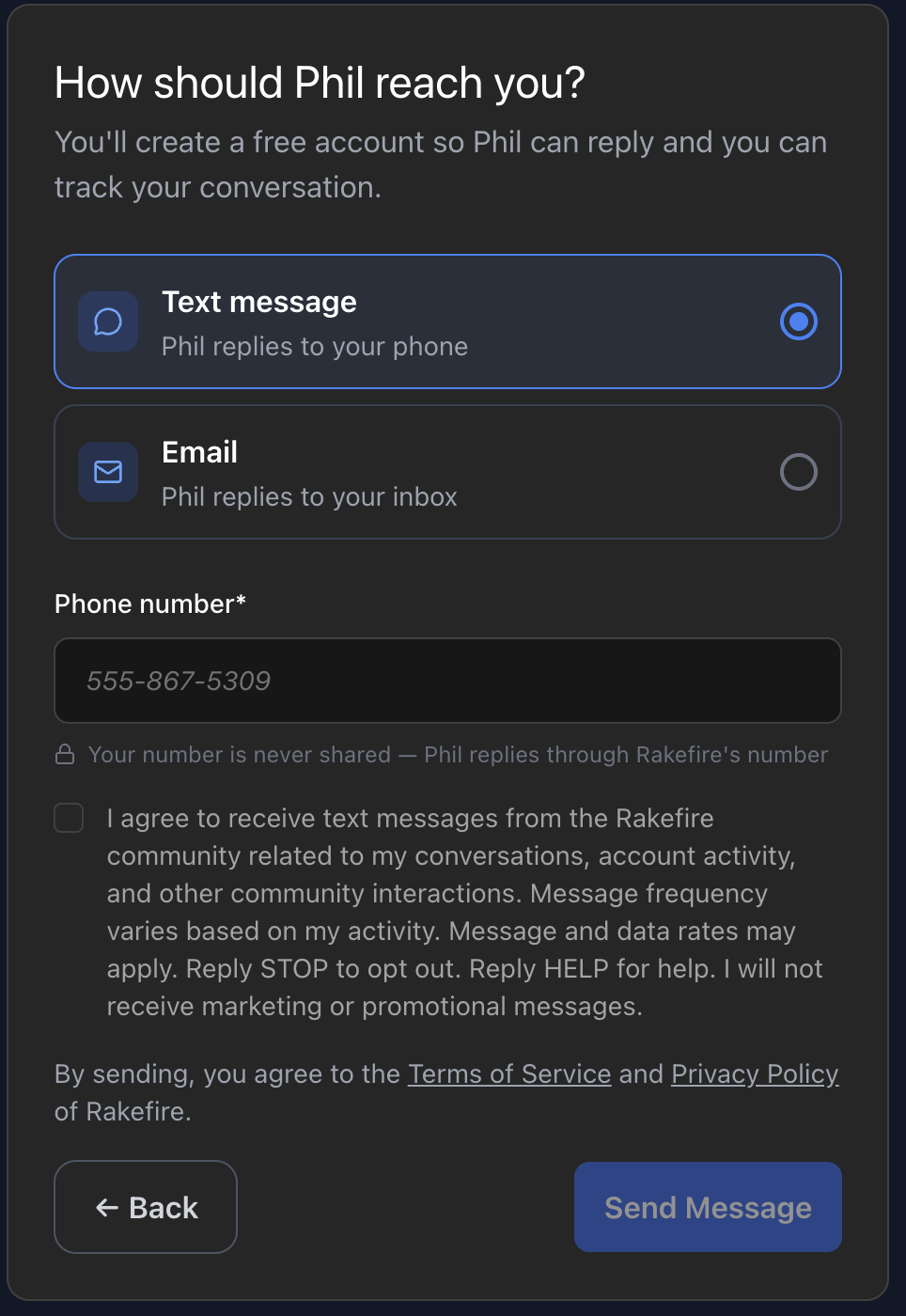
The opt-in checkbox is unchecked by default. When a prospect selects Text message, the consent checkbox confirms their preference to receive replies via SMS. Prospects who prefer Email receive responses to their inbox — providing SMS consent is never a condition of receiving a reply.
Flow 2: Advocate Opt-In — Community Application Form
Advocates opt in to SMS when they submit their application to join a community. The application form lives at [brand].stokedhq.com/join.
Example: https://rakefire.stokedhq.com/join
Application form
The form collects contact information and profile details for the advocate’s community listing. Phone number is a required field — it is used to relay inbound prospect messages to the advocate via SMS.
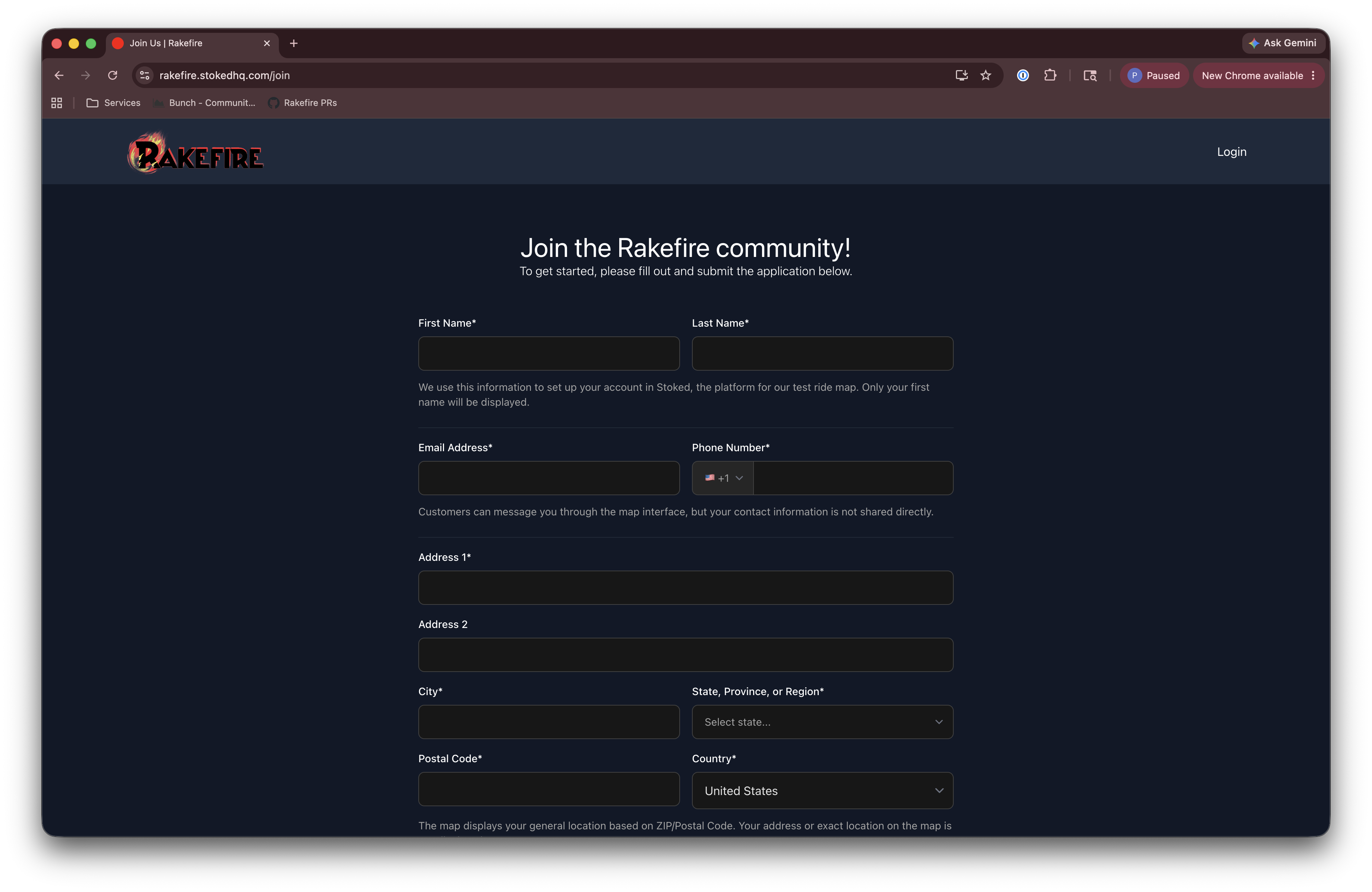
SMS consent at submission
At the bottom of the form, immediately above the Submit button, advocates are presented with an SMS consent checkbox.
The checkbox language is:
I agree to receive text messages from the [Community Name] community related to new conversations, replies from Prospects, and other community interactions. Message frequency varies based on my activity. Message and data rates may apply. Reply STOP to opt out. Reply HELP for help. I will not receive marketing or promotional messages.
The form also links to the community’s Terms of Service and Privacy Policy before submission.
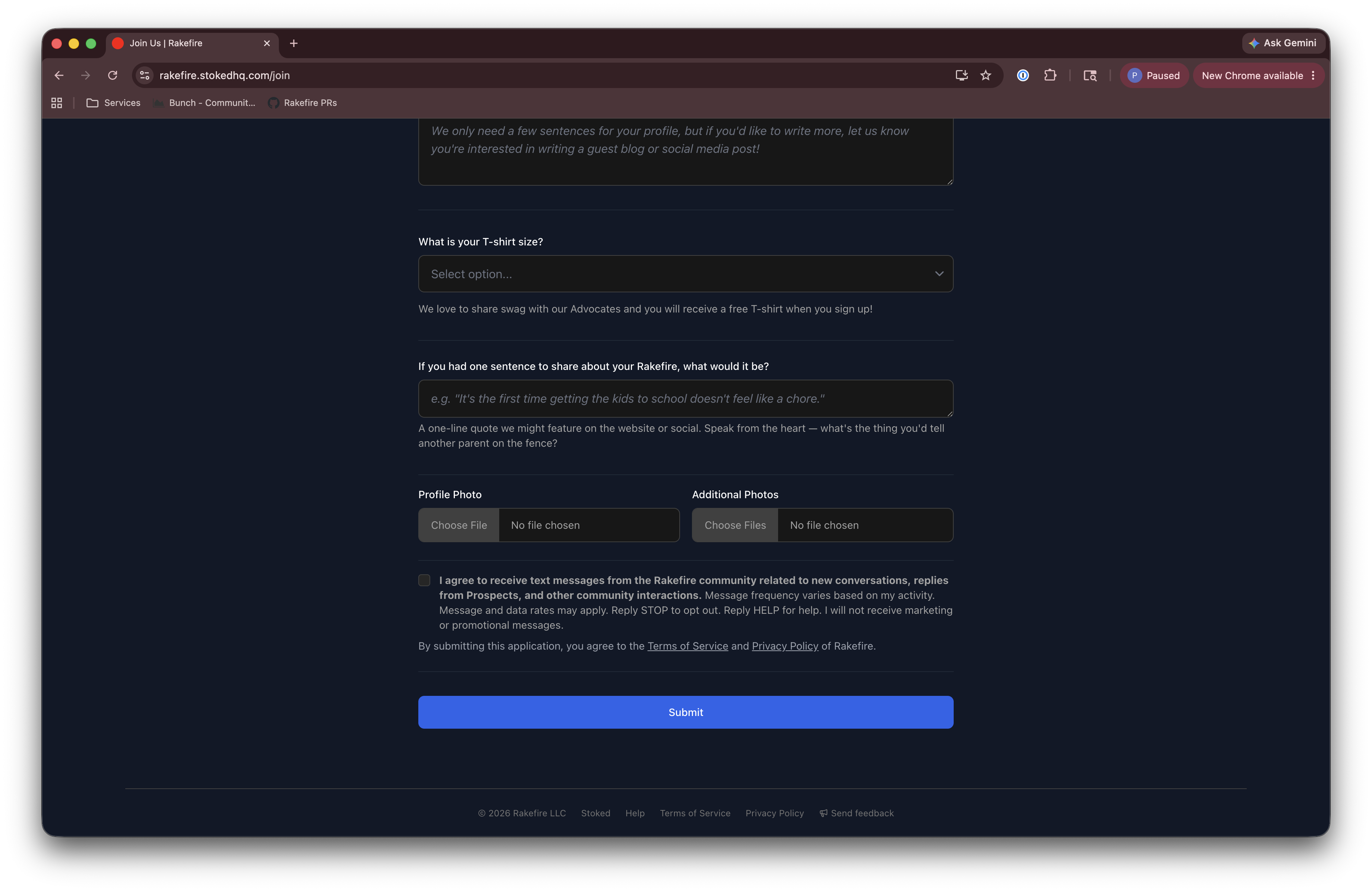
The opt-in checkbox is unchecked by default and is not required.
Opt-Out and Help
Standard CTIA opt-out and help keywords are supported and always disclosed in the opt-in consent language:
| Keyword | Response |
|---|---|
| STOP | Removes the user from future SMS and sends a confirmation message |
| HELP | Returns a help message with community contact information |
| START | Re-enables SMS for a previously opted-out number |
These keywords work on all Stoked community phone numbers.
Phone Number Privacy
Phone numbers are never shared with third parties, other advocates, or other community members. All SMS relay through the community’s dedicated Twilio phone number:
- Prospects message the community number; their personal number is not disclosed to the advocate.
- Advocates receive relayed messages at their registered number; their personal number is not disclosed to prospects.
Summary of Compliance Elements
| Requirement | Prospect Flow | Advocate Flow |
|---|---|---|
| Opt-in is affirmative and unchecked by default | ✓ | ✓ |
| Brand/community name identified in consent | ✓ | ✓ |
| Message frequency disclosed | ✓ | ✓ |
| “Message and data rates may apply” disclosed | ✓ | ✓ |
| STOP opt-out instruction | ✓ | ✓ |
| HELP instruction | ✓ | ✓ |
| “No marketing or promotional messages” stated | ✓ | ✓ |
| Terms of Service linked | ✓ | ✓ |
| Privacy Policy linked | ✓ | ✓ |
| Phone number privacy notice | ✓ | ✓ |
| Hosted screenshots of opt-in flow | ✓ | ✓ |